

- ✅ Safe fish range
- ✅ Bioload percentage
- ✅ Gallons per fish
so your pond stays balanced, stress-free, and crystal clear.
- Prevent overstocking and keep your fish healthy.
- Ensure ideal water quality for your pond.
- Receive personalized stocking recommendations instantly.
✨ Key Features & Highlights
- 🐟 Step-by-Step Stocking: Enter pond volume, select fish species & size, set filtration & aeration
- 📊 Live Bioload Analysis: See safe, moderate, or overloaded ranges instantly
- 💧 Gallons per Fish Info: Know exactly how much water space each fish needs
- 🌿 Pond Visualization: Visual representation of your pond’s stocking density
- ⚙️ Smart Recommendations: Filtration, aeration, and pond care tips
- 🏞️ All Pond Types: Safe for any pond configuration (backyard, koi, goldfish, mixed)
- ⏱️ Instant Results: No guesswork – professional calculations in seconds
How to Use the Smart Pond Fish Stocking Calculator
Learn how to safely determine how many fish your pond can hold with our Smart Pond Fish Stocking Calculator. This step-by-step guide will help you enter pond volume, select fish type and size, set filtration and aeration, and analyze bioload—ensuring your koi, goldfish, or mixed pond stays healthy and balanced.
- Step 1
- Step 2
- Step 3
- Step 4
- Step 5
- Step 6
- Step 7
- Step 8
- Step 9
Enter Pond Volume

- Enter your pond’s water volume in gallons (GAL) or liters (LIT).
- Optionally, calculate the volume from pond dimensions (Length × Width × Depth) if unknown.
What it does:
- Converts pond size into total water volume, the foundation for safe fish stocking.
Tip:
- Always measure accurately. Small errors can lead to overstocking or stressed fish.
Select Fish Type

- Choose your primary fish species: Goldfish, Koi, or Mixed Pond.
What it does:
- Assigns a gallons-per-fish ratio for safe stocking:
- Goldfish → 25 gal/fish
- Koi → 250 gal/fish
- Mixed Pond → 150 gal/fish
Tip:
- Pick the species representing most of your pond for accurate calculation.
Select Fish Size

- Select typical fish size:
- Small → 2–4 inches
- Medium → 5–8 inches
- Large → 9–15+ inches
What it does:
- Adjusts gallons per fish based on fish size because larger fish need more space.
Tip:
- Select current or expected average fish size, not just juvenile size.
Set Filtration Level

- Choose your filtration system:
- Basic → Standard filter
- Moderate → Good biological filter
- Advanced → Premium system
What it does:
- Adjusts bioload capacity. Better filtration → safer higher stocking density.
Tip:
- Upgrading filtration allows healthier pond and more fish.
Set Aeration

- Select aeration system:
- No Aeration → no air pump
- With Aeration → air pump or waterfall
What it does:
- Improves oxygen levels → increases safe stocking capacity.
Tip:
- Aeration is critical in summer or high-density ponds.
Current Fish Count (Optional)

- Enter how many fish are already in your pond.
What it does:
- Adjusts bioload calculation for accurate safe fish recommendation.
Tip:
- Include existing fish to prevent overcrowding.
Pond Visualization
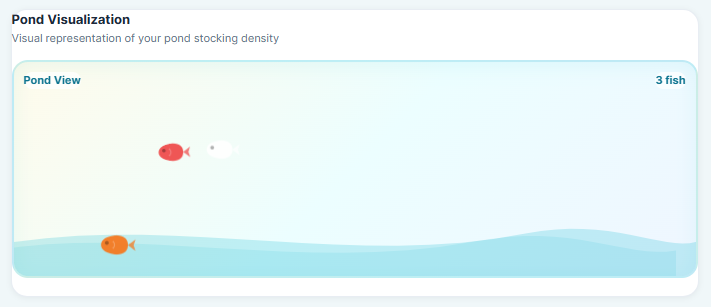
- See a visual representation of your pond stocking density.
- Quickly check if your pond is understocked, optimal, or crowded.
Tip:
- Use Pond View to easily compare actual fish count vs. pond capacity.
Bioload Analysis
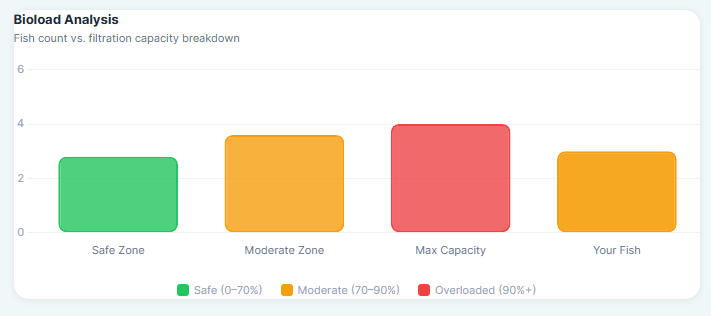
- Fish count vs. filtration capacity breakdown:
- Safe (0–70%)
- Moderate (70–90%)
- Overloaded (90%+)
Tip:
- Monitor bioload to maintain water quality and fish health.
- Take action if bioload is moderate or overloaded: upgrade filter, add aeration, reduce fish count.
View Live Results
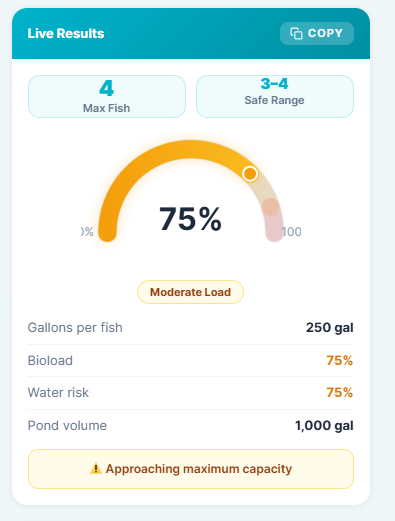
- See your Max Fish, Safe Range, Moderate Load, Gallons per Fish, Bioload, Water Risk, and Pond Volume instantly.
- Smart Insights show:
- Your pond can safely hold 3–4 fish
- Each fish has approximately 250 gallons of water space
- Bioload is at 75% of filtration capacity
- Calculation factors (Base, Size, Filtration, Aeration) are applied automatically.
- Alerts like “Approaching maximum capacity” help prevent overstocking.
Tip:
- Use the Live Results to adjust your fish count or pond setup before adding new fish.
- Always monitor water parameters even after following recommendations.
Understanding Pond Volume and Fish Capacity
Pond volume is the foundation of safe fish stocking. Knowing the gallons or liters in your pond ensures each fish has enough space to thrive.
Our calculator allows you to enter volume directly or calculate from dimensions, making it easy for any pond size.
Proper pond volume management prevents overcrowding, poor water quality, and stressed fish, ensuring a healthy aquatic environment.
Fish Types and Stocking Guidelines
- Different fish species require different space: Goldfish: 25 gal/fish, Koi: 250 gal/fish, Mixed Pond: 150 gal/fish.
- Selecting the right fish type in our planner adjusts calculations automatically for safe stocking density.
- Use the Smart Insights feature to see how many fish your pond can safely hold based on your selections.
Filtration and Aeration Factors
Filtration systems directly affect pond health and safe fish numbers: basic (standard), moderate (good biological), and advanced (premium).
Aeration systems like air pumps or waterfalls improve oxygen levels, allowing for a higher but safe fish stocking capacity.
The calculator adjusts the bioload percentage based on filtration and aeration factors to give realistic recommendations.
Interpreting Calculator Results
- Safe Range (0–70% bioload): Fish count is optimal; pond environment is stable.
- Moderate Load (70–90% bioload): Fish count is approaching maximum; monitor water quality regularly.
- Overloaded (90%+ bioload): Too many fish for your pond; risk of stress and poor water health.
- Each calculation shows gallons per fish, total bioload, pond volume, and water risk.
Smart Recommendations for a Healthy Pond
- Upgrade your filtration system if the bioload is high.
- You could consider adding aeration, such as a waterfall or air pump, to gently boost oxygen levels.
- Following premium feeding guidelines can help reduce waste and keep your pond’s water sparkling.
- Adding aquatic plants is a lovely way to support natural filtration and encourage oxygen balance.
Why Use the Smart Pond Fish Planner
- Avoid overstocking and fish stress with science-based calculations.
- Get instant, live results for safe fish numbers, gallons per fish, and bioload analysis.
- Perfect for backyard ponds, koi ponds, and goldfish ponds across the USA.
- Saves time and ensures your pond stays healthy, balanced, and visually stunning.
🐟 Try the Smart Pond Fish Planner Today – Enter your pond details and instantly discover the safe number of fish your pond can hold!
📌FAQ – Smart Pond Fish Stocking Calculator :
How do I calculate how many fish my pond can hold?
You can calculate your pond’s fish capacity by entering its volume (gallons or liters), selecting your fish species and size, and adjusting for filtration and aeration. Our Smart Pond Fish Stocking Calculator provides an instant safe fish count, bioload percentage, and gallons per fish.
Can I mix different fish species in one pond?
Yes! When mixing species, the calculator allows you to select a Mixed Pond option, which uses a safe average gallons per fish ratio to ensure all fish have enough space and oxygen.
How does pond volume affect fish stocking?
Pond volume is the foundation for safe fish stocking. Larger ponds can safely support more fish, while smaller ponds require careful calculations to prevent overcrowding, poor water quality, and stressed fish. Always measure your pond volume accurately using dimensions or direct water measurement.
How do filtration and aeration affect fish numbers?
Filtration and aeration directly impact your pond’s oxygen levels and ability to manage bioload. Better filtration and aeration allow for a slightly higher fish count while keeping your pond environment safe and balanced.
What is bioload and why is it important?
Bioload represents the total waste produced by fish relative to your pond’s filtration capacity. Maintaining a safe bioload ensures your water stays clear and fish remain healthy. The calculator shows safe, moderate, and overloaded bioload ranges.
Can I calculate fish stocking for koi and goldfish together?
Yes. Use the Mixed Pond option in the calculator, which factors in different species requirements and adjusts the safe fish range accordingly.
How often should I recalculate my pond’s fish capacity?
Recalculate whenever you add or remove fish, change your filtration or aeration system, or notice growth in fish size, as these factors directly affect the pond’s safe stocking capacity.
Is this calculator suitable for all pond types?
Absolutely. The Smart Pond Fish Planner works for backyard ponds, koi ponds, goldfish ponds, or mixed species ponds of any size across the USA.
